
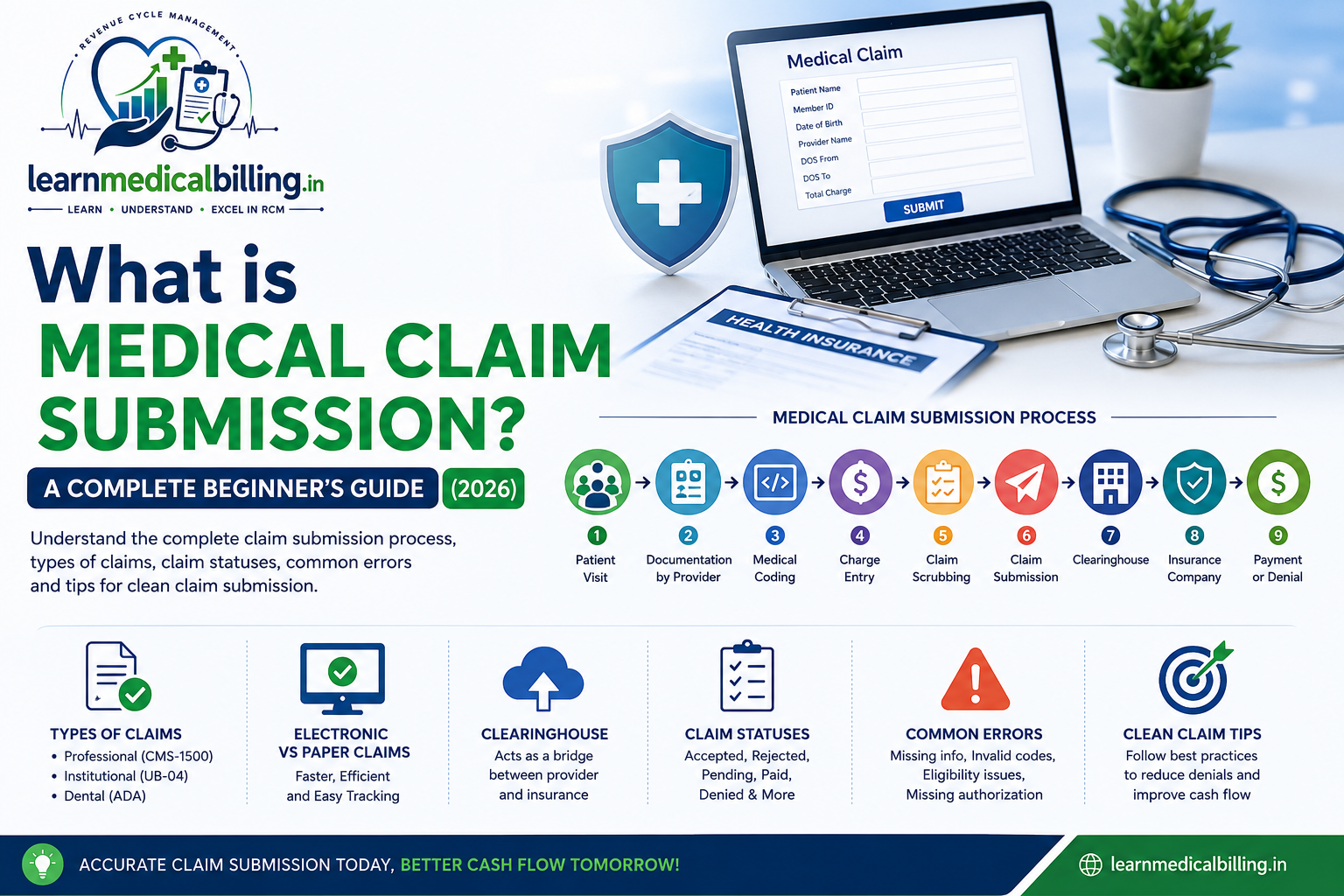
Medical claim submission is one of the most important steps in the US healthcare revenue cycle.
After a patient receives healthcare services, the provider needs to communicate the services performed, diagnoses, provider information, charges, and other required data to the patient’s health plan. The claim is the mechanism used to request payment.
For someone new to medical billing, terms such as claim, clearinghouse, CMS-1500, UB-04, 837P, 837I, rejection, denial, adjudication, and clean claim can initially seem complicated.
However, the basic concept is simple:
Patient receives care → Provider documents the service → Claim is created → Claim is submitted → Payer processes the claim → Payment or denial is issued.
This guide explains medical claim submission from A to Z, including the claim submission workflow, claim types, electronic claims, clearinghouses, claim statuses, common errors, rejection vs. denial, clean claims, and the role of an AR Caller.
What Is a Medical Claim?
A medical claim is a request for payment submitted to a health insurance payer for healthcare services provided to a patient.
The claim contains information that allows the payer to determine:
- Who received the service
- Who provided the service
- What service was performed
- Why the service was performed
- Where the service was performed
- When the service was performed
- How much was billed
- Which insurance plan should process the claim
Under HIPAA, the healthcare claim or equivalent encounter transaction includes a request for payment and the necessary accompanying information from a healthcare provider to a health plan.
Simple Example
Imagine a patient visits a physician for a follow-up appointment.
The provider performs the service and documents the encounter.
The billing team then creates a claim containing information such as:
Patient: John Smith
Date of Service: August 28, 2026
CPT: 99213
ICD-10-CM: I10
Provider NPI: XXXXXXXX
Charge: $150
The claim is then transmitted to the appropriate payer.
The payer reviews the claim and determines whether the service should be paid, denied, or otherwise processed.
What Is Medical Claim Submission?
Medical claim submission is the process of sending a healthcare claim to an insurance payer for processing and potential reimbursement.
In simple terms:
After a patient receives treatment, the healthcare provider sends a request for payment to the insurance company. That request is the medical claim, and the process of sending it to the payer is medical claim submission.
A claim can be submitted electronically or, when permitted or required, on paper.
For Medicare, electronic submission is generally required unless a provider qualifies for a waiver or exception. CMS identifies electronic claims as a standard part of Medicare billing and EDI operations.
Why Is Medical Claim Submission Important?
Claim submission directly affects the financial side of healthcare.
A correctly submitted claim helps the payer understand:
- What service was provided
- Why the patient needed the service
- Who provided it
- Whether the patient was eligible
- Whether authorization was required
- Whether the service is covered
- How much the payer should pay
1. Providers Receive Reimbursement
Healthcare organizations depend on insurance reimbursement and patient payments to maintain their operations.
2. Payers Can Adjudicate Claims
Insurance companies need accurate claim information to determine benefits, coverage, payment, and patient responsibility.
3. Patients Receive Accurate Billing
Once the payer processes the claim, the remaining patient responsibility can be determined according to the plan’s benefits and the claim’s adjudication.
4. Clean Submission Reduces Delays
Incorrect information can cause a claim to reject, deny, suspend, or require additional work.
Therefore:
Accurate claim → Faster processing → Faster payment → Lower AR
Medical Claim Submission Workflow
A basic medical claim workflow looks like this:
Patient Visit
      ↓
Provider Documents Services
      ↓
Medical Coding
      ↓
Charge Entry
      ↓
Claim Creation
      ↓
Claim Scrubbing
      ↓
Claim Submission
      ↓
Clearinghouse / EDI Connection
      ↓
Insurance Payer
      ↓
Claim Adjudication
      ↓
Payment / Denial / Other Processing Result
      ↓
Payment Posting & AR Follow-Up
Not every payer uses exactly the same technical workflow, but this represents the general revenue-cycle process.
Step 1: Patient Receives Healthcare Services
The process begins when the patient receives medical care.
Examples include:
- Office visit
- Preventive visit
- Emergency department service
- Surgery
- Diagnostic testing
- Physical therapy
- Laboratory service
- Imaging
- Hospitalization
The provider documents the services and clinical information in the medical record.
Step 2: Provider Documents the Encounter
Documentation may include:
- Chief complaint
- History
- Examination
- Medical decision-making
- Procedures
- Diagnoses
- Treatment
- Medications
- Orders
- Test results
- Follow-up plan
The documentation should support the services that are ultimately reported on the claim.
Step 3: Medical Coding
The coding team translates the clinical documentation into standardized codes.
Common code sets include:
CPT
Used primarily to report many physician and other professional services and procedures.
HCPCS Level II
Used for services and supplies such as certain drugs, equipment, ambulance services, and Medicare-specific services.
ICD-10-CM
Used to report diagnoses and other conditions relevant to the encounter.
Revenue Codes
Used primarily on institutional claims to identify categories of services and supplies.
The exact codes used depend on the type of service and claim.
Step 4: Charge Entry
The coded services are entered into the practice management or billing system.
Charge entry can include:
- Patient information
- Provider
- Date of service
- CPT/HCPCS
- ICD-10-CM
- Units
- Charges
- Modifiers
- Place of service
- Insurance information
Incorrect charge entry can create problems later in the claim process.
Step 5: Claim Scrubbing
Before submission, the claim may pass through an internal or clearinghouse claim scrubber.
The purpose is to identify potential errors before the claim reaches the payer.
A claim scrubber may check for issues such as:
- Missing information
- Invalid codes
- Invalid combinations
- Missing modifiers
- Incorrect provider information
- Payer-specific requirements
- Duplicate claims
- Demographic inconsistencies
A scrubber does not guarantee that a claim will be paid.
It simply helps identify potential problems before submission.
Step 6: Claim Submission
Once the claim is ready, it is transmitted to the payer.
Electronic claims generally use standardized electronic transaction formats.
Under HIPAA, Version 5010 of the ASC X12N 837 standard was adopted for healthcare claim transactions.
For Medicare professional claims, the electronic format is 837P.
For Medicare institutional claims, the electronic format is 837I.
CMS identifies 837P as the professional electronic claim format and 837I as the institutional electronic claim format.
What Is a Clearinghouse?
A medical claims clearinghouse is an electronic intermediary that helps transmit healthcare claims between providers and payers.
A simple way to understand it is to think of a clearinghouse as a post office for electronic claims.
Instead of every medical practice maintaining a separate technical connection with every payer, a clearinghouse can provide connectivity to multiple payers.
Simple Example
Provider / Billing System
          ↓
     Clearinghouse
          ↓
      Health Plan
          ↓
      Adjudication
          ↓
 Payment / Denial / Other Result
The clearinghouse may perform validation and editing before transmitting the claim.
However, a clearinghouse does not decide whether a medical service is covered or medically necessary.
That decision belongs to the payer’s claims-processing and adjudication system.
CMS explains that EDI transactions can be transferred with the assistance of a clearinghouse or billing service.
Professional vs. Institutional Claims
One of the first concepts a beginner should learn is the difference between professional and institutional claims.
Professional Claims
Professional claims are generally used for services reported by physicians and other professional healthcare providers.
For Medicare, the electronic format is:
837P
The corresponding paper form, when paper submission is permitted, is:
CMS-1500
CMS identifies the CMS-1500 as the standard professional paper claim form for Medicare when a provider qualifies for a paper-claim waiver or exception.
Examples of professional providers include:
- Physicians
- Nurse practitioners
- Physician assistants
- Therapists
- Certain other professional providers and suppliers
Institutional Claims
Institutional claims are generally used by institutional providers.
For Medicare:
837I = Electronic institutional claim
CMS-1450 / UB-04 = Paper institutional claim when permitted
CMS identifies CMS-1450, commonly known as the UB-04, as the institutional paper claim form.
Examples of institutional providers can include:
- Hospitals
- Skilled nursing facilities
- Certain home health organizations
- Other institutional providers
Dental Claims
Dental claims use a different claim format.
For electronic HIPAA transactions:
837D = Dental claim
Dental paper claims may use the applicable ADA Dental Claim Form.
CMS identifies 837D as the standard electronic dental claim format and also identifies the applicable paper dental claim form for Medicare dental claims.
CMS-1500 vs. UB-04 vs. Electronic Claims
| Claim Type | Electronic Format | Paper Form |
|---|---|---|
| Professional | 837P | CMS-1500 |
| Institutional | 837I | CMS-1450 / UB-04 |
| Dental | 837D | ADA Dental Claim Form |
The exact submission method depends on the payer and applicable requirements.
Electronic Claims vs. Paper Claims
| Electronic Claims | Paper Claims |
|---|---|
| Faster transmission | Slower physical transmission |
| Automated validation available | More manual handling |
| Easier electronic tracking | Tracking can be more difficult |
| Standard electronic transactions | Requires applicable paper form |
| Generally preferred by Medicare | Used when permitted or required |
| Easier integration with billing systems | More manual processing |
Important Correction
Do not say:
“Paper claims are used only when required.”
A better statement is:
Paper claims are generally used when permitted under the payer’s rules, including situations where a provider qualifies for an applicable waiver or exception.
For Medicare, CMS states that initial claims generally must be submitted electronically unless an exception or waiver applies.
What Happens After the Claim Is Submitted?
Claim submission is not the end of the process.
The payer may perform several levels of processing.
A simplified Medicare example is:
Claim Submitted
      ↓
Front-End / HIPAA Edits
      ↓
Claim-Level / Implementation Guide Edits
      ↓
Coverage & Payment Edits
      ↓
Adjudication
      ↓
Payment / Rejection / Denial / Suspension
CMS explains that electronic Medicare claims are subjected to initial edits, additional claim-level edits, and then coverage/payment policy edits. Depending on the error, a claim may be rejected for correction or denied.
What Is Claim Adjudication?
Claim adjudication is the payer’s process of reviewing a claim and determining how it should be processed under the member’s plan and applicable rules.
The payer may evaluate factors such as:
- Eligibility
- Benefits
- Provider participation
- Procedure codes
- Diagnosis codes
- Medical necessity
- Authorization
- Coverage
- Contractual rates
- Modifiers
- Claim history
- Other payer information
The final result may include payment, denial, patient responsibility, or another processing outcome.
Medical Claim Statuses
A claim can have different statuses during its lifecycle.
Accepted
The claim has successfully passed the applicable submission or intake process and has been accepted for further processing.
Important: Accepted does not necessarily mean paid.
A claim can be accepted and later denied.
Rejected
A rejection generally means the claim has an error that prevents it from being processed as submitted.
The claim can generally be corrected and resubmitted.
CMS distinguishes claim rejection from claim denial and explains that rejected claims can be corrected and resubmitted.
Pending
The claim is still being processed or is awaiting additional information or another processing step.
Suspended
The claim is temporarily held while the payer or contractor performs additional review or obtains information.
CMS distinguishes a suspended claim from a rejected or denied claim.
Paid
The payer has processed the claim and issued or initiated payment according to the applicable adjudication.
Denied
A claim or claim line has been adjudicated and is not approved for payment.
CMS distinguishes a denial from a rejection because a denial generally involves an adjudication decision and may be subject to appeal rather than simple resubmission.
Rejection vs. Denial
This is one of the most important concepts for AR Callers.
| Rejection | Denial |
|---|---|
| Claim has an error preventing processing | Claim has been adjudicated but payment was not approved |
| Usually corrected and resubmitted | May require reconsideration or appeal |
| Often occurs before full adjudication | Occurs after adjudication |
| Example: invalid member ID | Example: medical necessity denial |
| Focus: fix the claim | Focus: determine whether payer decision is correct |
Example of a Rejection
Claim rejected because:
Invalid member ID
The billing team verifies the correct ID, corrects the claim, and resubmits according to payer requirements.
Example of a Denial
Claim denied because:
Service not medically necessary
The billing team reviews the medical record and payer policy.
If the denial is incorrect and documentation supports payment, the team may pursue the payer’s reconsideration or appeal process.
What Is a Clean Claim?
A clean claim is a claim submitted with the information required by the applicable payer and without known errors that would prevent normal processing.
A clean claim generally contains accurate:
- Patient information
- Subscriber information
- Insurance information
- Provider information
- NPI
- Tax identification information when applicable
- Date of service
- CPT/HCPCS
- ICD-10-CM
- Modifiers
- Units
- Charges
- Place of service
- Authorization information when required
However, “clean claim” does not mean:
“The payer must pay the claim.”
A claim can be clean and still deny because of:
- Non-covered services
- Medical necessity
- Benefit limitations
- Frequency limitations
- Eligibility
- Contractual issues
- Other payer rules
Common Claim Submission Errors
1. Incorrect Patient Information
Examples:
- Wrong name
- Wrong DOB
- Wrong address
- Wrong gender when required by payer processing
2. Incorrect Member ID
A single incorrect character can cause a claim rejection.
Always compare the member ID with the current insurance information.
3. Missing Subscriber Information
This can happen when the patient is not the policyholder.
Examples:
- Missing subscriber name
- Incorrect relationship
- Missing subscriber DOB
- Incorrect subscriber ID
4. Invalid CPT or HCPCS Code
The code may be:
- Invalid
- Deleted
- Incorrectly entered
- Not valid for the date of service
5. Invalid ICD-10-CM Code
The diagnosis may be:
- Invalid
- Incomplete
- Incorrectly entered
- Not valid for the date of service
6. Missing Modifier
Some services require modifiers to accurately describe the circumstances of the service.
Examples include:
- Modifier 25
- Modifier 59
- Laterality modifiers
- Other applicable modifiers
Never add a modifier simply to force payment.
The documentation and payer/coding rules must support it.
7. Incorrect Place of Service
Place of Service, or POS, identifies where a professional service was performed.
CMS maintains the POS code set used on professional claims.
8. Missing or Incorrect NPI
The billing or rendering provider information may be incorrect or incomplete.
9. Missing Authorization
Some services require prior authorization.
If authorization is required and not obtained, the claim may reject or later deny depending on the payer’s process.
10. Duplicate Claim
Submitting the same claim multiple times can create duplicate billing issues.
Common Reasons Claims Are Rejected
Common rejection reasons include:
- Invalid member ID
- Invalid patient information
- Missing subscriber information
- Invalid payer ID
- Missing NPI
- Invalid diagnosis
- Invalid procedure code
- Missing modifier
- Invalid claim format
- Missing required information
- Duplicate claim
- Invalid provider information
The exact rejection message and correction requirements depend on the payer or clearinghouse.
Common Reasons Claims Are Denied
Denials are different because the claim has generally reached an adjudication decision.
Common denial reasons include:
Medical Necessity
The payer determines that the documentation or diagnosis does not support coverage of the service under its applicable policy.
Authorization Required
The service required prior authorization and the applicable requirement was not satisfied.
Timely Filing
The claim was not submitted within the payer’s applicable filing period.
Coverage Terminated
The patient did not have active coverage for the date of service.
Non-Covered Service
The service is excluded or not covered under the patient’s plan.
Duplicate Claim
The payer considers the service already billed or processed.
Benefit Limitation
The patient has reached a frequency or benefit limit.
Provider Issue
The provider may not meet network, enrollment, credentialing, or other payer requirements.
Claim Rejection vs. Denial: AR Workflow
When an AR Caller receives a claim issue, the first question should be:
Is this a rejection or a denial?
If Rejected
Identify error → Correct claim → Resubmit → Track acceptance
If Denied
Identify denial reason → Review EOB/ERA → Research payer policy → Determine root cause → Correct, reconsider, or appeal as appropriate
This distinction prevents unnecessary appeals and incorrect resubmissions.
How to Submit a Clean Claim
A strong clean-claim process begins before the claim reaches the clearinghouse.
Step 1: Verify Eligibility
Confirm coverage for the date of service.
Check:
- Member status
- Effective date
- Termination date
- Plan
- Network
- Benefits
- Authorization requirements
Step 2: Verify Patient Information
Confirm:
- Patient name
- DOB
- Member ID
- Subscriber information
- Relationship to subscriber
Step 3: Verify Provider Information
Check:
- Billing NPI
- Rendering NPI
- Tax ID
- Provider enrollment
- Specialty
- Address
Step 4: Verify Coding
Confirm:
- CPT
- HCPCS
- ICD-10-CM
- Modifiers
- Units
- POS
Step 5: Check Authorization
Determine whether prior authorization is required for the service.
If required, verify that the authorization:
- Exists
- Matches the patient
- Matches the service
- Matches the provider when required
- Covers the applicable date or service period
Step 6: Scrub the Claim
Run the claim through the practice’s applicable claim-editing process.
Step 7: Submit the Claim
Transmit electronically through the appropriate EDI pathway, clearinghouse, payer portal, or other permitted method.
Step 8: Confirm Acceptance
Review the clearinghouse or payer acknowledgement.
Do not assume:
“Submitted = accepted.”
A claim may be transmitted successfully but later rejected.
Claim Submission Checklist
Before submission, ask:
Patient correct?
Insurance correct?
Member ID correct?
Subscriber correct?
Provider correct?
NPI correct?
CPT/HCPCS correct?
ICD-10-CM correct?
Modifier correct?
POS correct?
Authorization verified?
Claim scrubbed?
Timely filing checked?
Submit.
What Is Timely Filing?
Timely filing is the deadline established by a payer for submitting a claim after the date of service or another applicable event.
The deadline varies by payer, plan, contract, and claim circumstances.
Therefore, never assume:
“All insurance companies give 365 days.”
Some payers may have shorter or longer filing periods, and contractual or governmental rules can affect the deadline.
For AR purposes, always verify the applicable payer policy or provider contract.
What Happens If a Claim Misses Timely Filing?
The payer may deny the claim for timely filing.
Depending on the payer’s rules, the provider may need to:
- Correct the claim
- Provide proof of timely submission
- Submit a reconsideration
- File an appeal
- Provide documentation explaining the delay
The exact resolution depends on the payer.
What Is a Claim Acknowledgment?
An acknowledgment is a response indicating that a claim or electronic transaction was received or processed through a particular stage.
It does not necessarily mean the claim will be paid.
For example:
Claim transmitted
↓
Acknowledgment received
↓
Claim accepted for processing
↓
Adjudication
↓
Payment or denial
CMS explains that successful electronic transmission generates an acknowledgment report for Medicare claims.
What Is an ERA?
ERA stands for Electronic Remittance Advice.
It provides electronic information about how a payer processed a claim.
An ERA can contain information such as:
- Amount billed
- Allowed amount
- Paid amount
- Adjustment amounts
- Patient responsibility
- Denial information
- CARCs
- RARCs
AR and payment-posting teams use the ERA to understand the payer’s adjudication.
What Is an EOB?
EOB stands for Explanation of Benefits.
It is a payer document explaining how a claim was processed.
Depending on the payer, an EOB can show:
- Billed amount
- Allowed amount
- Insurance payment
- Patient responsibility
- Adjustments
- Denial reason
- Claim status
EOB vs. ERA
The concepts are related, but the delivery format differs.
EOB → Explanation provided to the member/provider in a statement or document
ERA → Electronic remittance transaction used for automated payment posting and claim processing information
Role of the Clearinghouse in Claim Submission
A clearinghouse can provide several important functions.
Claim Transmission
It can transmit electronic claims to participating payers.
Claim Validation
It can identify certain formatting or data problems before transmission.
Payer Routing
It can route claims according to payer connectivity information.
Claim Responses
It can return acknowledgments, rejections, and other electronic responses.
Reporting
Billing teams can use clearinghouse reports to monitor claim activity.
However, clearinghouse acceptance is not equivalent to payer adjudication.
This is a critical AR concept.
Clearinghouse Accepted vs. Payer Accepted
Suppose your billing system says:
Accepted
That does not automatically mean:
“The insurance company accepted the claim for payment.”
You need to understand which acceptance level the system is reporting.
For example:
Billing System
      ↓
Clearinghouse Received
      ↓
Clearinghouse Accepted
      ↓
Payer Received
      ↓
Payer Accepted
      ↓
Adjudication
      ↓
Paid / Denied
The exact sequence varies by system and payer.
AR Caller Role in Medical Claim Submission
Claim submission is not only the responsibility of the billing team.
AR Callers become involved when the claim does not progress as expected.
AR Caller Responsibilities
An AR Caller may:
- Check claim status
- Review payer responses
- Identify rejected claims
- Research denied claims
- Contact insurance representatives
- Verify claim receipt
- Request claim corrections
- Follow up on pending claims
- Research timely filing
- File reconsiderations
- Submit appeals
- Document payer calls
- Track reference numbers
- Resubmit corrected claims
- Monitor unpaid balances
AR Caller Claim Status Workflow
A practical AR workflow is:
Claim Submitted
      ↓
Check Acceptance
      ↓
Rejected?
 ┌────┴────┐
YES       NO
 ↓         ↓
Correct   Check
Claim     Payer Status
 ↓         ↓
Resubmit  Pending?
           ↓
        Follow Up
           ↓
        Paid / Denied
              ↓
        Review EOB/ERA
              ↓
       Take Correct Action
AR Call Script: Claim Not Received
When the payer says the claim cannot be located:
“I’m calling to verify the status of a claim for date of service [DOS]. The claim was submitted on [submission date]. Could you please confirm whether the claim has been received and processed in your system?”
If they cannot locate it:
“Can you confirm the appropriate electronic payer ID or submission address for this provider and claim type?”
Then ask:
“If we need to resubmit the claim, will the payer consider the original submission date for timely filing if we provide proof of the original transmission?”
Document the representative’s response and reference number.
AR Call Script: Claim Pending
“I’m calling to follow up on a claim for date of service [DOS]. Could you please confirm the current status and the reason the claim is still pending?”
Then ask:
“Is any additional information required from the provider before the claim can be finalized?”
Also ask:
“Can you provide the expected processing timeframe and call reference number?”
AR Call Script: Denied Claim
“I’m calling regarding claim number [claim number] for date of service [DOS]. The claim denied. Could you please provide the exact denial reason, including the applicable CARC or RARC if available?”
Then:
“Can you confirm whether the claim can be corrected and resubmitted, or whether the payer requires reconsideration or an appeal?”
This question can prevent the AR team from taking the wrong action.
Common Claim Submission Mistakes
Mistake 1: Assuming Submission Means Payment
Submission is only one step.
Mistake 2: Treating Rejection as Denial
A rejection generally needs correction and resubmission.
A denial generally requires analysis of the payer’s adjudication.
Mistake 3: Automatically Resubmitting Denials
A denied claim should not automatically be resubmitted as a new claim.
Review the payer’s instructions first.
Mistake 4: Automatically Appealing Everything
Not every denial requires an appeal.
Some claims need correction.
Some denials are valid.
Some require documentation.
Mistake 5: Ignoring the Payer’s Filing Limit
A corrected claim or appeal can still be affected by applicable filing deadlines.
Mistake 6: Assuming Clearinghouse Acceptance Means Payer Acceptance
Always distinguish clearinghouse responses from payer adjudication.
How Claim Submission Connects to the Revenue Cycle
Medical claim submission sits in the middle of the revenue cycle.
A simplified RCM workflow is:
Patient Registration
        ↓
Eligibility Verification
        ↓
Authorization
        ↓
Patient Visit
        ↓
Documentation
        ↓
Coding
        ↓
Charge Entry
        ↓
Claim Submission
        ↓
Adjudication
        ↓
Payment Posting
        ↓
Denial Management
        ↓
AR Follow-Up
        ↓
Patient Billing
A problem at an earlier stage can create a problem later.
For example:
Eligibility error
↓
Claim submitted to wrong payer
↓
Claim rejection
↓
Delayed billing
↓
Higher AR
This is why clean claim submission is part of overall revenue-cycle management.
Claim Submission and First-Pass Resolution
A strong claim-submission process can improve the percentage of claims that move through the billing process without avoidable corrections or manual intervention.
However, avoid saying:
“Claim scrubbing guarantees a 100% clean claim rate.”
No billing system can guarantee that.
Payer rules change, patient information changes, benefits vary, and some claim decisions require clinical or policy review.
The goal is to reduce preventable errors, not eliminate every possible denial.
Medical Claim Submission Best Practices
Verify Eligibility
Check eligibility for the date of service.
Verify Benefits
Understand the applicable plan benefits.
Verify Authorization
Obtain authorization when required.
Use Accurate Coding
Ensure CPT, HCPCS, and ICD-10-CM codes accurately reflect the documented services and conditions.
Use Correct Modifiers
Apply modifiers only when supported.
Verify Provider Information
Check NPI, taxonomy, enrollment, and payer participation as applicable.
Verify POS
Use the appropriate place-of-service code for professional claims.
CMS maintains the current POS code set.
Check Timely Filing
Submit within the payer’s applicable deadline.
Scrub Before Submission
Identify preventable errors before transmission.
Monitor Responses
Review acknowledgments, rejections, payer claim status, and remittance information.
Medical Claim Submission Example
Let’s follow a simple example.
Patient Visit
A patient visits a primary care provider.
Documentation
The physician documents the patient’s condition and services performed.
Coding
The coder assigns appropriate CPT and ICD-10-CM codes.
Charge Entry
The billing team enters the charges.
Claim Scrubbing
The billing system identifies no known submission errors.
Submission
The claim is transmitted electronically.
Payer Processing
The insurance company receives and adjudicates the claim.
Result
The claim is approved for payment.
Payment Posting
The payment is posted to the patient’s account.
Final Result
The account is either:
- Fully resolved
- Has patient responsibility
- Requires secondary billing
- Requires AR follow-up
Another Example: Claim Rejection
Suppose a claim is submitted with an incorrect member ID.
The payer or clearinghouse rejects it.
AR/Billing Action
Step 1: Review rejection.
Step 2: Verify member ID.
Step 3: Correct the claim.
Step 4: Resubmit according to payer requirements.
Step 5: Confirm acceptance.
Step 6: Continue monitoring until adjudication.
This is generally a correction workflow, not a medical-necessity appeal.
Another Example: Claim Denial
Suppose the claim is accepted and adjudicated but denied because prior authorization was required.
The workflow becomes:
Step 1: Review denial.
Step 2: Verify whether authorization was actually required.
Step 3: Check whether authorization existed.
Step 4: Review payer policy.
Step 5: Determine whether correction, reconsideration, retroactive authorization, or appeal is available.
Step 6: Submit the appropriate action.
Step 7: Track the outcome.
Frequently Asked Questions
What is a medical claim?
A medical claim is a request for payment submitted to a health plan for healthcare services provided to a patient.
What is medical claim submission?
Medical claim submission is the process of sending a healthcare claim to an insurance payer for processing and potential reimbursement.
What is the difference between a claim and claim submission?
The claim is the actual request for payment and associated information.
Claim submission is the process of transmitting that claim to the payer.
What is a clearinghouse?
A clearinghouse is an electronic intermediary that helps healthcare providers transmit claims and receive electronic responses from participating payers.
Is a clearinghouse an insurance company?
No.
A clearinghouse facilitates electronic claim transactions. It does not determine whether the medical service is covered or whether the claim should be paid.
What is an 837P?
837P is the electronic healthcare claim format used for professional claims.
CMS identifies 837P as the standard electronic format for professional and supplier claims.
What is an 837I?
837I is the electronic format used for institutional healthcare claims.
What is a CMS-1500?
The CMS-1500 is the standard professional paper claim form used for Medicare when paper submission is permitted under applicable requirements.
What is a UB-04?
The UB-04, also referred to as the CMS-1450, is the institutional paper claim form.
What is a clean claim?
A clean claim is a claim submitted with the required information and without known errors that would prevent normal processing.
However, a clean claim is not a guarantee of payment.
What is a claim rejection?
A claim rejection generally indicates that the claim contains an issue preventing it from being processed as submitted. The claim can generally be corrected and resubmitted.
What is a claim denial?
A claim denial generally means the claim or claim line was adjudicated but payment was not approved.
The appropriate next step may be reconsideration, appeal, correction, or another payer-specific action depending on the denial.
What is the difference between rejection and denial?
The simplest distinction is:
Rejection → Fix the claim and resubmit
Denial → Analyze the payer’s decision and determine the appropriate resolution
Always verify the payer’s specific instructions.
How long does claim processing take?
There is no single processing time that applies to every claim.
Processing time can vary based on:
- Payer
- Claim type
- Electronic vs. paper submission
- Provider network status
- Claim complexity
- Medical review
- Authorization
- Additional information requests
- Payer workload
Therefore, check the specific payer’s processing timeframe rather than assuming one universal number.
Can paper claims still be submitted?
Yes, paper claims can still be used in certain circumstances, but the payer’s requirements must be followed.
For Medicare, electronic submission is generally required unless the provider qualifies for an applicable waiver or exception.
Does claim acceptance mean the claim will be paid?
No.
Acceptance means the claim has passed a particular stage of the submission process.
The payer can still deny the claim during adjudication.
Can a rejected claim be appealed?
Generally, a rejection is corrected and resubmitted rather than appealed.
CMS specifically distinguishes rejection from denial in its claims-processing terminology.
However, always follow the applicable payer’s instructions because terminology and workflows can vary.
Can a denied claim be resubmitted?
Do not automatically resubmit a denied claim as a new claim.
First determine why it denied and what action the payer allows.
The correct resolution may be:
- Corrected claim
- Reconsideration
- Appeal
- Documentation submission
- Authorization review
- No further action
Medical Claim Submission Quick Reference
| Step | What Happens |
|---|---|
| 1 | Patient receives service |
| 2 | Provider documents encounter |
| 3 | Services are coded |
| 4 | Charges are entered |
| 5 | Claim is created |
| 6 | Claim is scrubbed |
| 7 | Claim is submitted |
| 8 | Clearinghouse/EDI processes transaction |
| 9 | Payer receives claim |
| 10 | Payer adjudicates claim |
| 11 | Payment, denial, rejection, or other result |
| 12 | Payment posting and/or AR follow-up |
Medical Claim Submission Cheat Sheet
Professional
837P → CMS-1500
Institutional
837I → CMS-1450 / UB-04
Dental
837D → ADA Dental Claim Form
Rejection
Correct → Resubmit
Denial
Research → Determine resolution → Reconsider/appeal/correct when appropriate
Clean Claim
Accurate information + correct coding + required data + payer requirements
AR Caller
Check → Research → Call → Document → Correct/Appeal → Follow Up
Final Takeaway
Medical claim submission is one of the most important processes in the healthcare revenue cycle.
A claim begins with accurate patient and provider information, continues through documentation and coding, passes through claim creation and submission, and eventually reaches payer adjudication.
The basic workflow is:
Patient Care
↓
Documentation
↓
Coding
↓
Charge Entry
↓
Claim Scrubbing
↓
Claim Submission
↓
Payer Adjudication
↓
Payment or Denial
↓
AR Follow-Up
For beginners, remember these three concepts:
Claim = Request for payment
Submission = Sending the claim to the payer
Adjudication = Payer’s decision on how the claim should be processed
For AR Callers, understanding this workflow is essential because a claim can fail at several different stages.
A rejection generally requires correction and resubmission.
A denial requires investigation of the payer’s adjudication and the appropriate next action.
A clean claim improves the chance of efficient processing, but it does not guarantee payment.
The most effective medical billing teams therefore do more than simply submit claims. They verify eligibility, understand payer requirements, use accurate coding, monitor claim responses, identify root causes, and take the correct action when a claim does not process as expected.
Accurate claim submission today helps build a healthier revenue cycle tomorrow.
For more practical guides on medical billing, AR calling, denial management, Medicare, Medicaid, eligibility, prior authorization, coding, and Revenue Cycle Management, visit LearnMedicalBilling.in.